
Skip to content
Orin Cole
Orin Cole’s profile picture

Open to frontend roles

Orin
Cole

Frontend Engineer · Remote

I build user-facing web products in TypeScript and React.

Right now that means Capo — a Chrome extension that lets musicians change the pitch, speed, and volume of audio playing on any page. I work on it as a frontend engineer with the team at Elyra Lab: the practice interface, the controls around it, and what ships to the Chrome Web Store.

Selected work

What I have built

One shipped product I work on every day, the site that supports it, and four and a half years of client work behind both.

FeaturedChrome extension · Shipped product

Capo

Change the pitch, speed, and volume of audio playing on any page, without leaving the tab.

The problem

Musicians practice along to songs that live in a browser tab. The song is rarely in a comfortable key, and it is almost always too fast to learn from. The usual answer is to download the audio and open a desktop editor — which is where practice stops.

My role

Frontend engineer on the Capo team at Elyra Lab. I own the practice interface and take it through testing and release.

What I built

  • Designed and built the practice controls — a ±12 semitone pitch dial with cents-level fine tuning, speed, volume, an A/B loop, and transport.
  • Worked on the audio path that inserts an AudioWorklet processor into pages we don’t control, so pitch changes apply to media that is already playing.
  • Built interfaces that span three JavaScript contexts — popup, background service worker, and two content scripts in separate worlds — under Manifest V3’s constraints.
  • Took the work through testing and release, and kept it current through Chrome Web Store updates, with releases automated in CI.

Built with

  • TypeScript
  • React 19
  • WXT (Manifest V3)
  • Tailwind CSS
  • Zustand
  • Radix UI
  • Web Audio · AudioWorklet
  • Vitest
  • Lingui
  • GitHub Actions

Status — Shipped on the Chrome Web Store and actively maintained.
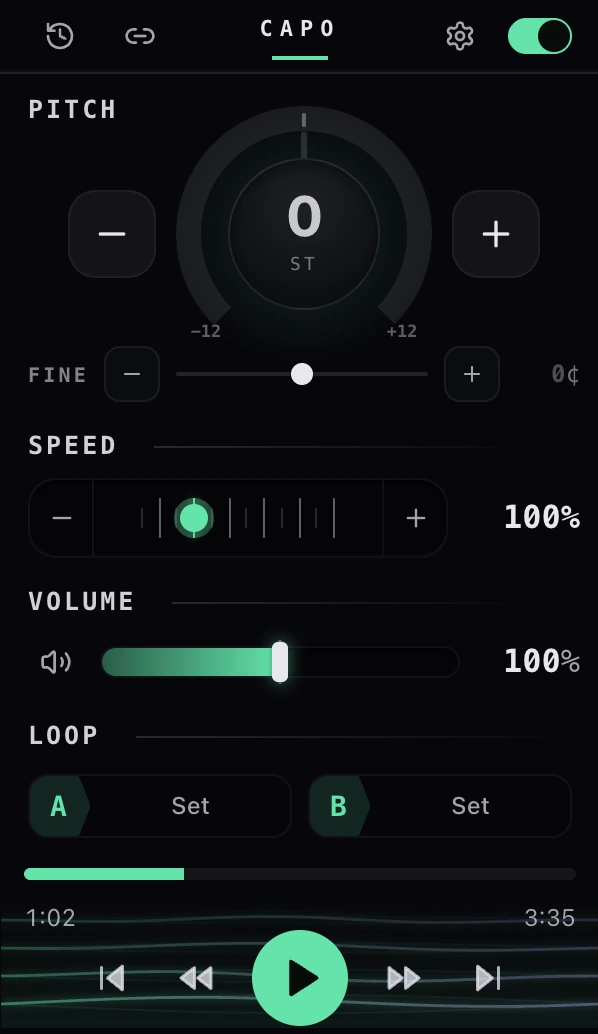
The Capo popup: a pitch dial reading 0 semitones with a fine-tune slider in cents, speed and volume controls, A/B loop buttons, and a transport bar at the bottom.

Product site & help center

capotune.com

2025 — present

The marketing site, help center, and release notes for Capo.

An extension gets one small listing on a store page. Everything else a prospective user needs — what it does, how to use a control, what changed in the last release — has to live somewhere it can be linked to and searched.

  • Built the site on the Next.js App Router with server components by default, and MDX for the long-form help and release content.
  • Set up localization with next-intl so the site speaks the same languages as the extension.
  • Structured the help center so a single answer can be linked directly from inside the extension.
  • TypeScript
  • Next.js (App Router)
  • next-intl
  • MDX
  • Tailwind CSS

Status — Live at capotune.com.

Visit capotune.com

DaLong Software Development Co. Ltd.

Client web applications

2021 — 2025

Four and a half years of responsive, user-facing web applications built with a design team.

Interfaces that looked settled in a design file still had to survive real browsers, real content lengths, and real devices — which is where most of the work actually was.

  • Built responsive interfaces in HTML, CSS, and JavaScript against cross-browser reliability requirements.
  • Turned user feedback into concrete UI and UX changes with the designers who drew them.
  • Debugged rendering and behavior differences between browsers to keep the experience consistent.
  • JavaScript
  • HTML
  • CSS
  • Responsive design
  • Cross-browser debugging

Status — Client work — no public artifacts I can share.

About

How I work

I work on the part of a product people actually touch. In practice that means TypeScript and React, and interfaces where a control has to read correctly at a glance, respond immediately, and behave the same way on the second use as it did on the first.

Capo is the clearest example of how I work. It answers a question worth answering — what would it take to move a song into a different key while it plays in a browser tab — and it is a real product on the Chrome Web Store. I work on it as a frontend engineer with the team at Elyra Lab, where I own the practice interface: the pitch, speed, and volume controls, the interactions around them, and the work of getting that through testing and release.

Before that I spent four and a half years at DaLong Software Development building responsive web applications alongside designers, mostly closing the gap between how an interface is drawn and how it behaves in a real browser on a real device. That is still the work I like most: taking something that technically functions and making it reliable, fast, and obvious.

Experience

Where I have done it

  1. Frontend Engineer

    Present

    Elyra LabMyrtle Creek, OR · Remote

    I work on Capo, a Chrome extension for musicians, as a frontend engineer on the team — I own the practice interface and follow it through to what ships on the Chrome Web Store.

    • Designed and developed the practice experience: the pitch, speed, and volume controls a musician reaches for while a song is playing, and the interactions around them.
    • Built the extension’s interfaces in TypeScript and React with control clarity as the priority — someone mid-song should never have to stop and work out what a control does.
    • Developed browser-extension features and integrated audio processing into the page’s playback path, so adjustments apply to media that is already running.
    • Designed product features around how people actually practice a song, rather than around what the audio pipeline made easy to expose.
    • Ran the cycle from planning through testing and release, and kept the extension current through Chrome Web Store updates.
    • Interface ownership
    • Browser extensions
    • Interactive audio UI
    • Testing
    • Release
  2. Web Developer (Junior → Senior)

    DaLong Software Development Co. Ltd.Shanghai, China

    Four and a half years building user-facing web applications, moving from implementing designs to owning the interfaces themselves.

    • Built responsive web applications in HTML, CSS, and JavaScript, with usability and cross-browser reliability as the standing requirements rather than a final pass.
    • Worked directly with designers to turn user feedback into concrete UI and UX changes.
    • Troubleshot and debugged issues across multiple browsers to keep behavior and performance consistent.
    • Responsive interfaces
    • UX implementation
    • Cross-browser debugging
    • Design collaboration

Technical skills

What I work with

Grouped by what the work is, not by logo. Everything here is something I have used on shipped work.

01

Frontend engineering

What I write day to day.

  • JavaScript
  • TypeScript
  • React
  • Vue.js
  • HTML
  • CSS
  • Bootstrap
  • Tailwind CSS

02

Product & workflow

How the work gets planned, checked, and shipped.

  • Agile / Scrum
  • GitHub Actions
  • Docker
  • Prettier
  • WXT

03

Quality & UX

The parts that decide whether an interface holds up.

  • Browser extension development
  • Responsive interface design
  • Cross-browser compatibility
  • Testing & debugging

Education

Where I trained

Computer Science

Sep 2020Jun 2024

Shanghai Jiao Tong UniversityShanghai, China

Coursework across algorithms, software engineering, databases, operating systems, computer networks, and artificial intelligence, alongside team-based software projects.

Contact

Hiring for a frontend role?

I am open to frontend roles, remote. If you want to see how I think before you write, the Capo case study is the honest version — decisions, tradeoffs, and the parts that were hard.

Colophon — about this site

Stack
Next.js App Router, TypeScript in strict mode, Tailwind CSS v4. No UI library, no animation library, no state library — nothing here needed one.
Rendering
Every section is a server component. Three things ship JavaScript: the section nav with its progress bar, the mobile menu, and the button that copies the email address.
Type
Space Grotesk for display, Inter for text, JetBrains Mono for labels and data. Self-hosted through next/font, so no layout shift on load.
Media
Screenshots are real captures of Capo, served as WebP at fixed dimensions through next/image and lazy-loaded below the fold.
Accessibility
Semantic landmarks, one h1 per page, visible focus rings, a skip link, keyboard paths for everything, and prefers-reduced-motion honored globally. Lighthouse 100 on both routes.